The Ultimate Guide to Crafting the Perfect Holiday Greeting with Our Merry Christmas Card Digital Template
The holiday season is a time of warmth, connection, and creativity. For crafters, card makers, and DIY enthusiasts, this period represents not just a celebration, but a creative opportunity to share personalized love with friends and family. In an era where mass-produced greeting cards often lack that personal touch, creating your own Merry Christmas Card has become a cherished tradition. However, the barrier to entry for high-quality design can sometimes feel daunting. That is precisely why our digital download collection exists: to bridge the gap between professional design aesthetics and hands-on crafting joy.
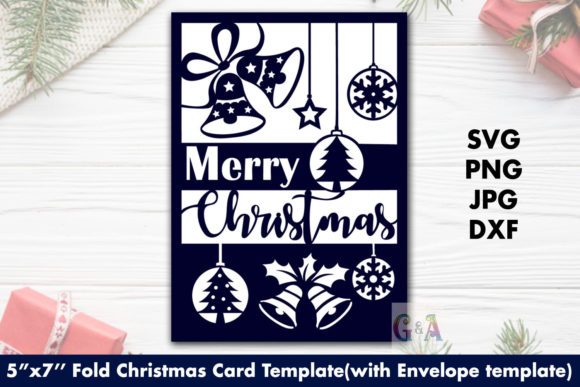
This article explores everything you need to know about utilizing our premium Merry Christmas Card SVG template, including technical specifications, compatible formats, and how to seamlessly integrate these files into your existing crafting workflow. Whether you are a seasoned pro with a Cricut Maker or a beginner picking up scissors for the first time, this guide will help you create stunning 5”x7” folded cards and perfectly fitting envelopes in minutes.
Why Choose a Digital SVG Template?
Before diving into the specifics of our product, it is worth understanding why digital vector files have revolutionized the crafting industry. Unlike raster images (like standard JPEGs) which can become pixelated when resized, SVG (Scalable Vector Graphics) files retain their crisp edges at any size. This makes them ideal for cutting machines and precise papercrafting.
By opting for a digital Merry Christmas Card template, you gain several distinct advantages:
- Instant Gratification: No waiting for shipping. Once purchased, you can start designing immediately.
- Cost-Effectiveness: One purchase allows for unlimited prints and cuts, making it far cheaper than buying individual physical cards.
- Customization: You can adjust colors, materials, and embellishments to match your unique style without altering the core design integrity.
- Eco-Friendly: Reduce paper waste by only printing what you need, exactly when you need it.
Comprehensive File Formats for Every Workflow
We understand that every crafter uses different software and hardware. To ensure maximum compatibility, our Merry Christmas Card package is not limited to a single format. We provide a comprehensive suite of file types designed to work across various platforms and machine brands.
SVG Files: The Gold Standard for Cutting Machines
The SVG format is the primary file type used by popular cutting machines such as Cricut Design Space and Silhouette Studio. These files contain the mathematical data required for the blade to follow precise paths. With our included SVG files, you can easily import the design, resize it if necessary, and send it directly to your machine for clean, accurate cuts.
DXF Files: Compatibility Across Software
For users who prefer other vector editing software like Adobe Illustrator, Inkscape, or CorelDRAW, we include DXF files. DXF (Drawing Exchange Format) is widely supported and ensures that your designs remain editable and scalable regardless of the program you choose to use.
PNG and JPG: Versatility for Printing and Embellishment
While SVG and DXF are crucial for cutting, PNG and JPG files serve different purposes. High-resolution PNGs (with transparent backgrounds) are perfect for digital scrapbooking, social media graphics, or adding decorative elements via inkjet printing. JPG files offer a quick preview and are suitable for basic printing tasks where transparency isn't required.
Design Specifications: Precision Meets Elegance
A great card starts with great proportions. Our Merry Christmas Card design is meticulously crafted to fit standard stationery sizes while offering ample space for personal messages. Understanding the dimensions is key to avoiding frustration during the assembly process.
The Card Dimensions
The design is based on a preset canvas size of 12 inches wide by 12 inches high within the software, but the actual cut lines are optimized for a classic look:
- Unfolded Size: 10 inches wide by 7 inches high. This provides a generous surface area for your festive artwork.
- Folded Size: 5 inches wide by 7 inches high. This is a standard A6-sized card, which fits perfectly into most commercial envelopes and mailboxes.
The Envelope Dimensions
One of the most common pain points in card making is finding an envelope that fits snugly. Our template solves this by providing a dedicated envelope design that matches the card’s proportions exactly.
- Unfolded Size: 9.3 inches wide by 11.3 inches high.
- Folded Size: 7.3 inches wide by 5.3 inches high.
Note that the envelope is slightly larger than the card (by 0.3 inches on each side), allowing for easy insertion without crimping the edges. This slight tolerance is critical for a polished, professional finish.
What’s Inside Your Download Folder?
Upon purchase, you will receive a convenient ZIP folder containing all the assets needed to bring your vision to life. The organization is straightforward, ensuring you can find exactly what you need without sifting through clutter.
- Main ZIP Archive: Contains two separate subfolders—one for the Card and one for the Envelope.
- Card Folder Contents:
- 02 SVG files (optimized for Cricut/Silhouette)
- 02 DXF files (for alternative vector software)
- High-res PNG and JPG previews
- Envelope Folder Contents:
- 02 SVG files
- 02 DXF files
- High-res PNG and JPG previews
This structure means you have everything required to cut both the card base and the envelope from the same digital source, ensuring consistency in line weight and detail.
Tips for Best Results with Your Merry Christmas Card
To get the most out of this Merry Christmas Card digital template, consider these practical tips from experienced crafters:
Material Selection Matters
While you can use standard printer paper, the true beauty of this design shines through with heavier cardstock. We recommend using 80lb to 110lb cardstock for the main body. For a luxurious feel, try textured cotton paper or metallic finishes. The intricate details of the SVG cut lines will pop against darker or richer colored papers.
Blade Care and Calibration
If you are using a cutting machine, ensure your blade is sharp. Dull blades can cause jagged edges, especially on thicker cardstock. Calibrate your machine settings before starting. For example, a Cricut might require a "Heavy Card" setting, while Silhouette users may need to adjust the pressure dial. Always do a small test cut on scrap paper first.
Assembly Techniques
When folding your 5”x7” card, use a bone folder or the back of a butter knife to score the fold line before bending. This creates a crisp, straight crease that looks professionally manufactured. Similarly, for the envelope, fold along the scored lines gently to maintain the structural integrity of the flaps.
Personalization Opportunities
This template is a blank canvas for your creativity. Use the negative space created by the cut-outs to layer different colored papers behind the front panel. Add glitter glue, ribbon, or hand-lettered sentiments inside. Because the digital file is yours to manipulate, you can tweak the layout in software like Inkscape to add text or change element positions if desired.
Who Is This Template For?
This Merry Christmas Card kit is versatile enough for a wide range of users:
- Small Business Owners: Create custom holiday cards for clients or sell handmade cards at local markets.
- Hobbyist Crafters: Enjoy a relaxing weekend project that results in tangible, beautiful gifts.
- Teachers and Parents: Lead classroom workshops where students can create their own holiday greetings.
- Digital Artists: Use the PNG files for digital invitations or social media holiday posts.
Final Thoughts
In a world dominated by digital communication, there is something profoundly special about holding a physical card made by your own hands. Our Merry Christmas Card digital template removes the technical hurdles of design, allowing you to focus on what truly matters: the message of goodwill and the joy of creation. With instant access to high-quality SVG, DXF, PNG, and JPG files, you are equipped to produce elegant 5”x7” cards and matching envelopes that stand out in any mailbox.
Download today, gather your favorite cardstocks, and let your creativity shine this holiday season. Happy crafting!