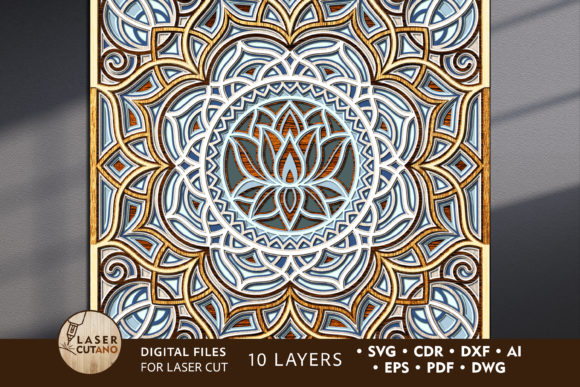
Multilayer Cut File MANDALA: Elevate Your Laser Cutting Projects
If you are looking to add a touch of intricate elegance to your home decor or commercial displays, the Multilayer Cut File MANDALA offers a sophisticated solution. This digital asset is not just a simple silhouette; it is a complex, multi-dimensional design specifically engineered for precision cutting machines. Whether you operate a laser cutter, a CNC router, or even a high-end plotter like the Cricut, this file provides the structural blueprint needed to transform flat materials into stunning three-dimensional art pieces.
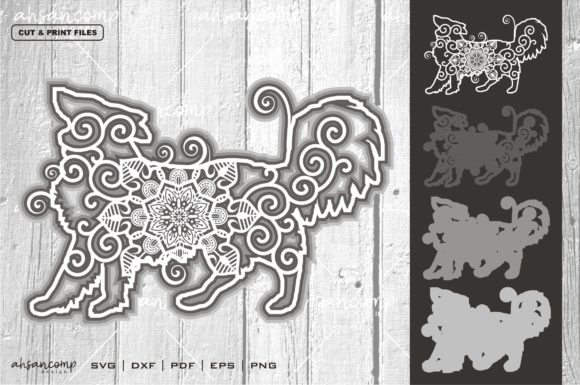
The beauty of this mandala design lies in its depth. Unlike single-layer cutouts that lie flat against a surface, the multilayer layout creates shadows and highlights that change depending on the viewing angle and lighting. This dynamic quality turns a static wall hanging or table centerpiece into an interactive visual experience. For creators, hobbyists, and small business owners alike, these files represent a bridge between digital precision and tactile craftsmanship, allowing you to produce professional-grade decor with ease.
Understanding the Digital Blueprint
At its core, the Multilayer Cut File MANDALA is a collection of vector layers stacked to create a cohesive 3D effect. When you purchase this product, you receive a comprehensive .zip file containing designs in multiple industry-standard formats: .AI, .SVG, .DXF, .DWG, .CDR, .EPS, and .PDF. This versatility ensures compatibility across a wide range of software environments, from Adobe Illustrator and CorelDRAW to free online editors and proprietary machine software.
Before diving into the cutting process, it is crucial to unzip the folder immediately after download. The files are organized to streamline your workflow, but proper extraction is the first step toward success. Each layer within the mandala design corresponds to a specific physical cut, meaning you will need to cut each layer individually before assembly. The design is optimized for a finished size of 15 x 15 inches, providing a substantial presence without overwhelming smaller spaces. However, the digital nature of the file allows for scalability, giving you the freedom to adjust dimensions to fit larger walls or smaller decorative niches.
Material Selection and Technical Specifications
The success of your project depends heavily on choosing the right materials. The recommended thickness for the Multilayer Cut File MANDALA ranges from 3 mm to 6 mm (approximately 1/8 inch to 1/4 inch). This thickness is ideal for maintaining structural integrity while remaining lightweight enough for easy mounting.
- Plywood: Offers a warm, natural aesthetic. Ensure you use high-quality plywood with minimal voids to prevent uneven cuts.
- MDF (Medium Density Fiberboard): Provides a smooth, uniform surface that takes paint exceptionally well, making it perfect for vibrant, colorful finishes.
- Acrylic and Plexiglas: Ideal for modern, sleek looks. Acrylic can be left clear for a glass-like appearance or dyed for bold color impacts.
- Metal: For industrial chic designs, thin metal sheets can be used, though this requires more powerful laser equipment.
- Cardboard and Paper: Suitable for prototyping or lighter, temporary installations, though they lack the durability of wood or plastic.
When selecting your material, consider how it interacts with your cutting machine. Thicker materials may require slower speeds and higher power settings to ensure clean edges. Conversely, thinner materials might burn if the laser dwell time is too long. Experimenting with scrap pieces before committing to your final project is always a wise practice.
Assembly and Finishing Techniques
One of the most critical aspects of working with multilayer designs is the assembly process. Each layer of the Multilayer Cut File MANDALA must be glued together to achieve the intended 3D effect. A common mistake among beginners is assembling the layers before painting. To achieve a professional finish, it is highly recommended to paint each layer individually before gluing them together. This approach prevents paint from seeping into the seams and ensures that the inner layers remain hidden yet perfectly colored.
Consider using spacers or double-sided foam tape between layers to enhance the depth effect. This technique adds shadow lines that make the mandala appear to float, significantly increasing its visual impact. Once painted and spaced, use a strong adhesive suitable for your chosen material—wood glue for MDF and plywood, or specialized acrylic adhesives for plastics. Allow ample drying time to ensure the structure remains rigid and does not warp over time.
Practical Applications Across Industries
The versatility of the Multilayer Cut File MANDALA extends far beyond personal home decor. Its applications span various sectors, offering value to different types of users.
Home Decor and Interior Design
Transform your living space into a sanctuary. Use the mandala as a focal point on a feature wall, behind a sofa, or above a bed. The interplay of light and shadow created by the layers can soften harsh lighting, creating a calming atmosphere. It serves as a unique alternative to traditional framed art, adding texture and dimension to any room.
Commercial and Retail Spaces
For entrepreneurs and business owners, these files offer a cost-effective way to customize retail environments. Imagine a boutique hotel lobby adorned with large-scale mandala installations, or a yoga studio featuring layered wooden mandalas that promote tranquility. Restaurants and cafes can use smaller versions as table centerpieces or hanging decorations, enhancing the customer experience through distinctive visual branding.
Educational and Creative Workshops
Educators and hobbyist groups can utilize these files to teach principles of geometry, symmetry, and design. The process of cutting and assembling the layers provides hands-on learning opportunities for students interested in engineering, art, or carpentry. It encourages problem-solving skills as learners navigate the challenges of alignment and material handling.
Maximizing Value and Usability
When evaluating digital cut files, usability is key. The Multilayer Cut File MANDALA is designed with user convenience in mind. The layered structure is logical, typically progressing from the largest background layer to the smallest foreground details. This hierarchy simplifies the cutting sequence, reducing errors and waste.
Furthermore, the ability to scale the design allows for creative experimentation. You can increase the size for grand architectural features or reduce it for jewelry boxes, coasters, and gift tags. However, caution is advised when scaling down. Reducing the design too much may result in the loss of thin elements that are difficult to cut or handle. Always preview the scaled version in your design software to ensure all details remain intact.
Final Thoughts on Implementation
Incorporating the Multilayer Cut File MANDALA into your projects is about more than just following instructions; it is about embracing creativity and precision. By understanding the nuances of material selection, layering techniques, and finishing methods, you can produce results that rival mass-produced decor. Whether you are a seasoned pro or a curious beginner, this digital asset provides a robust foundation for creating beautiful, lasting works of art.
To ensure you can easily find this resource again for future projects, consider favoriting the store or listing where you acquired the files. As technology evolves and new cutting tools emerge, having access to high-quality, versatile vector files becomes increasingly valuable. Embrace the potential of laser cutting and CNC routing to bring your artistic vision to life with the intricate beauty of the mandala.