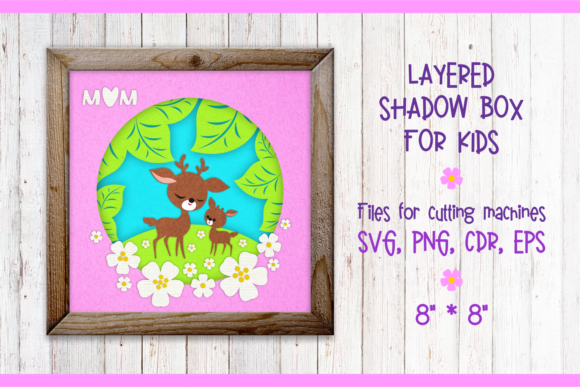
Mother Deer with a Fawn. Shadow Box
Nature offers some of the most enduring symbols of tenderness, protection, and growth. The image of a mother deer standing watch over her fawn is one such symbol, evoking a sense of quiet strength and nurturing care. For creators, designers, and craft enthusiasts, translating this emotional resonance into physical art requires more than just a pretty picture; it requires structure, depth, and precision. This is where the Mother Deer with a Fawn. Shadow Box digital product becomes an invaluable asset. It is not merely a static image but a comprehensive toolkit designed to bring a two-dimensional concept into a three-dimensional space.
This digital package provides everything needed to create intricate layered designs that pop off the page or canvas. By utilizing multi-layer vector files, you can control the depth, spacing, and visual hierarchy of your artwork. Whether you are a seasoned graphic designer looking to expand your portfolio or a hobbyist eager to make a heartfelt gift for a child’s nursery, this resource bridges the gap between digital creativity and tangible craftsmanship.
Understanding the Technical Foundation
The versatility of any digital design file often dictates its usability across different platforms and projects. The Mother Deer with a Fawn. Shadow Box package is built on robust technical specifications to ensure compatibility and ease of use. It includes four primary file formats: CDR, EPS, SVG, and PNG. Each format serves a specific purpose in the creative workflow.
- SVG (Scalable Vector Graphics): This is the gold standard for cutting machines like Cricut and Silhouette. Because SVGs are vector-based, they allow for precise cuts without losing quality, regardless of size. They are ideal for creating the individual layers that will be stacked to form the shadow box effect.
- EPS (Encapsulated PostScript): A widely accepted vector format in professional design software like Adobe Illustrator and CorelDRAW. EPS files preserve complex paths and gradients, making them perfect for high-quality printing or further editing by professional designers.
- CDR (CorelDRAW File): Specifically tailored for users working within the CorelDRAW ecosystem. This ensures that all layer separations and vector paths remain intact and editable for those who prefer this software suite.
- PNG (Portable Network Graphics): Included at 300 dpi with a transparent background, these raster images are ready for immediate use in photo editing software, social media graphics, or direct printing. The transparency allows the design to blend seamlessly onto any background color or texture.
All vector files included in this package are easily scaled and edited. This means you can resize a small card design to fit a large wall art piece without pixelation or loss of detail. The multi-layer nature of the design is crucial; it allows you to separate the background elements from the foreground figures, creating the illusion of depth that defines a shadow box.
Creative Applications and Project Ideas
Once you have mastered the basics of handling these files, the possibilities for application are vast. The Mother Deer with a Fawn. Shadow Box design is versatile enough to serve various audiences and purposes. Here are several practical ways to utilize this digital asset:
Personalized Nursery Decor
One of the most popular uses for this design is in nursery decoration. The gentle imagery appeals to parents seeking calming, nature-inspired themes for their children’s rooms. You can cut the layers from thick cardstock or foam board, painting them in soft pastels or natural earth tones. By spacing the layers apart using spacers or double-sided foam tape, you create a dynamic shadow box that changes appearance depending on the lighting in the room. This adds a sophisticated, gallery-like touch to a child’s space.
Handmade Greeting Cards and Invitations
For entrepreneurs and freelancers in the stationery business, this design offers a premium product line. Imagine a wedding invitation suite with a rustic woodland theme, or a sympathy card that conveys comfort and support through the imagery of maternal protection. The ability to edit the vectors allows you to add custom text, dates, or names directly into the design file before exporting. This level of customization increases the perceived value of your products and helps you stand out in a crowded market.
Educational Crafts for Children
Parents and educators can use this project as an engaging activity for children. Pre-cutting the layers might be necessary for younger kids, but older children can participate in the assembly process. Discussing the layers teaches concepts of perspective and depth. Assembling the shadow box encourages fine motor skills and patience. It transforms a simple digital file into a memorable hands-on experience that results in a beautiful keepsake.
Design Tips for Professional Results
To get the most out of the Mother Deer with a Fawn. Shadow Box files, attention to detail is key. While the digital files provide the structure, your material choices and assembly techniques determine the final aesthetic. Keep these practical recommendations in mind:
- Material Selection: Since paper texture is not included in the package, you must choose your own materials wisely. For a clean, modern look, use matte white cardstock. For a warmer, organic feel, opt for kraft paper or textured linen paper. Avoid glossy finishes if you want to maintain the natural, serene vibe of the deer imagery.
- Layer Spacing: The magic of a shadow box lies in the negative space between layers. Experiment with different spacer heights. Wider spacing creates a more dramatic, theatrical effect, while tighter spacing feels more integrated and subtle. Use a ruler to ensure consistent gaps for a polished finish.
- Color Harmony: If you plan to paint or dye your layers, stick to a cohesive color palette. Analogous colors (like greens, browns, and creams) will enhance the natural theme. Complementary colors can be used sparingly for accent pieces, such as the eyes of the fawn or small floral details.
- Lighting Considerations: Shadow boxes interact dynamically with light. When displaying your finished piece, consider placing it near a window to let natural light cast shadows through the layers. Alternatively, adding a small LED strip light behind the backboard can illuminate the design from within, highlighting the contours of the deer and creating a magical ambiance.
Why Choose Digital Downloads?
In an era where instant access and sustainability are increasingly valued, digital downloads offer distinct advantages. There is no shipping wait time, no packaging waste, and no risk of damage during transit. Once purchased, you have immediate ownership of the files, allowing you to print and produce as many copies as you need. This is particularly beneficial for small business owners who want to test market demand without committing to large inventory purchases. You can start with a single prototype, refine your technique, and then scale up production efficiently.
Furthermore, the editability of the vector files empowers you to adapt the design to changing trends or specific client requests. Perhaps a customer wants the deer in black and white for a minimalist decor scheme? With the CDR or EPS files, you can adjust the contrast and remove color fills instantly. This flexibility ensures that your work remains relevant and responsive to audience needs.
Conclusion
The Mother Deer with a Fawn. Shadow Box is more than just a digital file; it is a gateway to meaningful creation. It combines the beauty of nature with the precision of digital design, offering endless opportunities for expression. Whether you are crafting a unique gift for a loved one, enhancing your home decor, or building a profitable side hustle, this resource provides the tools you need to succeed. By leveraging the included SVG, EPS, CDR, and PNG files, you can bring a touch of wilderness and warmth into your projects, creating lasting impressions through thoughtful, well-executed design.