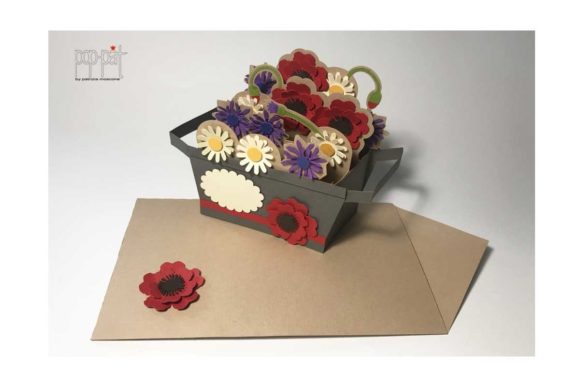
Explosion Box Summer: A Creative Digital Craft Solution
There is a distinct magic in holding a gift that unfolds before your eyes. It transforms a simple exchange into a memorable event, adding layers of surprise and delight to the recipient’s experience. This is the core appeal of the Explosion Box Summer, a digital craft design that has gained significant traction among hobbyists, scrapbookers, and professional card makers alike. Unlike traditional greeting cards or static photo albums, an explosion box opens up to reveal multiple compartments, hidden messages, and decorative elements, creating a three-dimensional narrative centered around a specific theme—in this case, the vibrant energy of summer.
For those looking to add a personal touch to birthdays, graduations, beach vacations, or end-of-year celebrations, understanding how to utilize these digital files effectively is key. The following guide explores what makes the Explosion Box Summer such a versatile tool for creativity, how to navigate its technical formats, and why it remains a popular choice for both beginners and seasoned crafters.
Understanding the Explosion Box Concept
An explosion box is essentially a sturdy square container with hinged sides that fold outward when opened. When fully extended, the interior reveals a flat surface populated with pockets, flaps, and layers. Each layer can hold photos, notes, small gifts, or decorative cutouts. The "Summer" variation typically incorporates thematic elements such as suns, waves, palm trees, ice cream cones, and bright color palettes that evoke feelings of warmth and leisure.
The primary value of this format lies in its interactivity. It encourages the creator to think spatially and narratively. You are not just placing a photo on a page; you are deciding which memory goes behind a flap, which message sits in a pocket, and how the visual flow guides the viewer’s eye across the open box. This level of customization allows for a deeply personal connection between the maker and the recipient.
Key Features and Characteristics
- Multi-Layered Design: Most explosion boxes consist of several layers stacked within one another. The Explosion Box Summer design follows this structure, allowing for depth and complexity in decoration.
- Thematic Consistency: The summer theme ensures that all cutouts and patterns work harmoniously together, reducing the need for extensive sourcing of disparate clip art.
- Digital Precision: As a digital file package, the design offers precise vector lines that ensure clean cuts and accurate assembly, minimizing material waste during construction.
- Scalability: Digital formats allow users to resize elements if needed, though maintaining proportions is crucial for the structural integrity of the box.
Navigating File Formats: SVG, DXF, PDF, and More
One of the most common points of confusion for new users involves the various file formats included in the download. To ensure the best results, it is essential to understand which file type corresponds to which machine or method of creation. The Explosion Box Summer package is designed to be compatible with a wide range of tools, but proper usage requires attention to detail.
The package typically includes SVG, DXF, and PDF files. Here is a breakdown of their purposes:
- SVG (Scalable Vector Graphics): This is the preferred format for Cricut and Silhouette cutting machines. SVGs contain path data that tells the blade exactly where to cut. They are resolution-independent, meaning they can be resized without losing quality.
- DXF (Drawing Exchange Format): Similar to SVG, DXF is widely used in CAD software and cutting machines. It is particularly useful for older versions of design software or specific industrial applications.
- PDF (Portable Document Format): PDFs are ideal for laser cutting or for users who plan to print the design on paper and cut it by hand. They provide clear visual guides and outline paths.
- EPS and AI: These vector formats are often included for use in Adobe Illustrator or CorelDRAW, allowing for advanced editing and customization by graphic designers.
Important Note for Cricut Users: If you are using a Cricut machine, please open the SVG_Cricut folder contained in your download. Inside, you will find specific instructions and notes tailored to Cricut Design Space. These notes may include advice on mirroring images, grouping elements, or setting cut weights to prevent errors during the cutting process. Ignoring these notes can lead to misaligned cuts or wasted materials.
Software Compatibility and Workflow
The versatility of the Explosion Box Summer lies in its broad compatibility. Whether you prefer cloud-based simplicity or desktop precision, there is a pathway for you.
Cricut Design Space
Cricut Design Space is user-friendly and accessible via web browser or app. When importing the SVG files from the designated folder, users should check the "Weld" or "Attach" functions to ensure that complex shapes remain connected during the cutting phase. The pre-grouped layers in the file save time, allowing you to focus on arranging the interior decorations rather than untangling digital knots.
Silhouette Studio
Silhouette Studio offers robust features for those who want more control over their designs. The software handles SVG and DXF files natively. Users can easily adjust the size of individual components, change colors, or modify text before sending the job to the Silhouette cutting machine. The Explosion Box Summer files are optimized for this workflow, ensuring that registration marks align correctly if you choose to print-and-cut techniques.
Scan-N-Cut
For those using the Brother Scan-N-Cut series, the PDF and SVG files serve different purposes. The Scan-N-Cut can read certain digital files directly, but often, users import the SVG into the accompanying software to prepare the layout. The high-quality vector lines in the Explosion Box Summer design ensure that even intricate details like lace-like borders or fine text are captured accurately by the machine’s camera sensors.
Practical Applications and Use Cases
While the Explosion Box Summer is undoubtedly beautiful, its utility extends beyond mere aesthetics. Here are some real-world scenarios where this digital asset proves invaluable:
- Graduation Gifts: A summer graduation is a common milestone. The box can feature photos from school years, tucked into pockets labeled by year, with a final compartment holding a diploma cover or a gift card.
- Birthday Celebrations: For a child’s birthday, the summer theme can incorporate beach balls, sandcastles, and swim gear. The interactive nature keeps children engaged as they discover each layer.
- Vacation Memories: After a family trip to a coastal destination, create a memory box. Each layer represents a different day or activity, preserving the experience in a tangible way.
- Small Business Inventory: Entrepreneurs selling handmade goods can use these boxes as premium packaging for jewelry, candles, or bath products. The unboxing experience adds perceived value to the product.
Evaluating Suitability and Limitations
Before diving into production, it is important to consider whether the Explosion Box Summer fits your current skill level and resources.
Strengths
The main strength is the reduction of guesswork. Structural engineering for boxes can be difficult; designing hinges and locks that hold weight without tearing requires practice. By using a pre-designed template, you bypass the trial-and-error phase of structural development. Additionally, the digital nature means you can test prints repeatedly without committing expensive cardstock until you are ready.
Considerations and Limitations
Material Quality Matters: Even the best digital file cannot compensate for poor physical materials. Thin paper may tear at the hinge points, while thick cardboard may be difficult to score cleanly. It is recommended to use cardstock between 180gsm and 250gsm for optimal results.
Time Investment: While the cutting is automated, the assembly and decoration are manual processes. An explosion box can take anywhere from two to five hours to complete, depending on the complexity of the embellishments. Ensure you have allocated sufficient time for gluing, folding, and decorating.
Technical Proficiency: While the files are ready-to-use, users must be comfortable navigating their respective software platforms. Understanding how to import files, check layer visibility, and set cut settings is a prerequisite. If you are completely new to digital crafting, spending time learning the basics of Cricut Design Space or Silhouette Studio beforehand will enhance your experience.
Conclusion
The Explosion Box Summer is more than just a collection of digital vectors; it is a framework for creativity. By providing precise templates compatible with major cutting machines like Cricut, Silhouette, and Scan-N-Cut, it lowers the barrier to entry for creating professional-grade, interactive gifts. Whether you are a busy parent looking for a unique present or a business owner seeking distinctive packaging, this design offers a reliable and visually stunning solution.
Remember to respect the instructions provided in the SVG_Cricut folder if you are a Cricut user, and always test your materials before final assembly. With careful preparation and a bit of patience, the Explosion Box Summer can become a centerpiece of your next celebration, turning ordinary moments into extraordinary memories.